GPT-6 Astra: Usecases for Content Creators
Reusable 3D asset libraries generated via AI offer rapid explainer and commercial pipelines without requiring advanced traditional 3D modeling expertise.
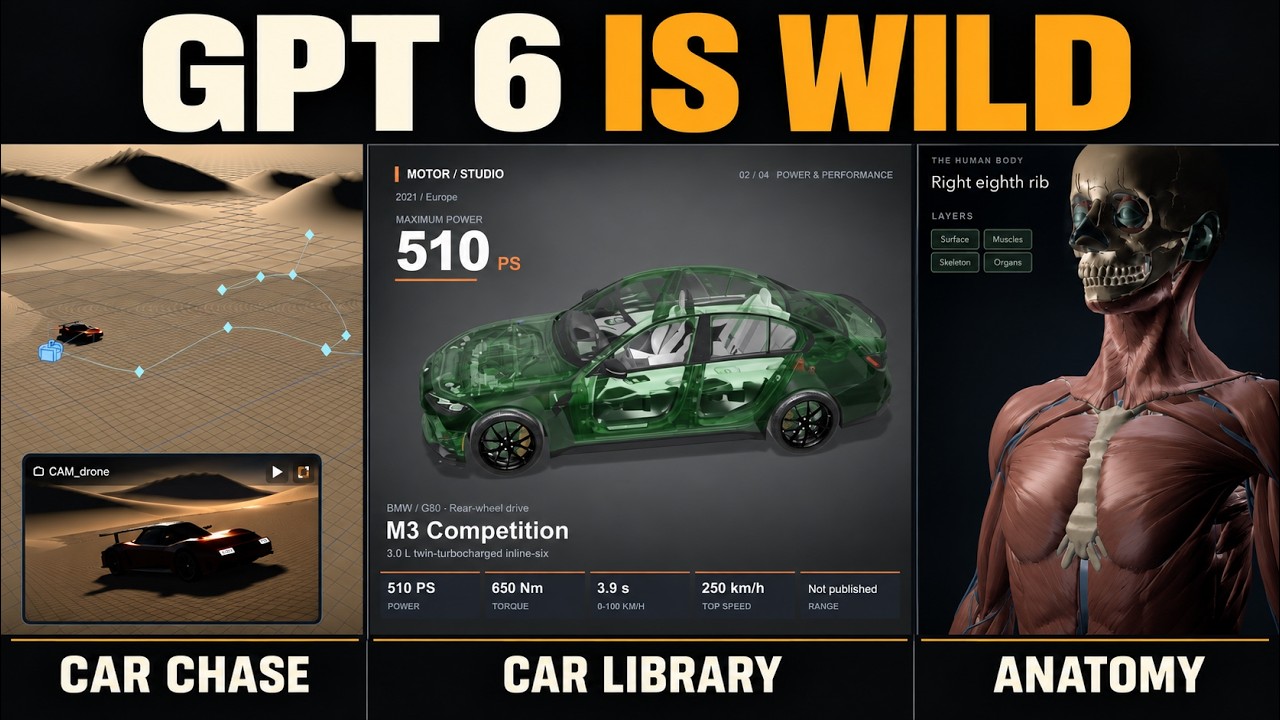
What this lesson covers
The video evaluates GPT-6 Astra for 3D camera moves, modular asset libraries, and explainer content compared against Blender workflows. It demonstrates how pre-configured 3D anatomy and automotive libraries streamline video production while explaining why face consistency still requires image-to-video pipelines.
Key takeaways from the creator
AI-extracted notes, not independently verified product claims. Timestamp links let you check each point in the original video.
- 0:14 ↗
Pre-building structured 3D asset libraries allows instant reuse across multiple video projects without recreating lighting or scene geometry.
- 0:35 ↗
GPT-6 Astra struggles with generating realistic known faces, making traditional image-to-video pipelines still preferable for documentary content.
- 1:26 ↗
Higgsfield's built-in 3D studio serves as an accessible alternative to Blender for non-3D artists needing quick camera moves and visual assets.
- 2:05 ↗
Prompting complex 3D camera dynamic trajectories directly can require several iterative passes before achieving smooth background motion.
- 4:40 ↗
Building modular anatomy models enables interactive isolation, zooming, opacity adjustment, and automated voiceover sync for explainer content.
Workflow outlined in the video
- Set up a base 3D scene in Higgsfield 3D Studio or a simplified Blender workspace.
- Prompt GPT-6 Astra to build modular, component-based 3D assets such as anatomy or automotive parts.
- Iteratively refine camera trajectories and environmental elements until movement matches the desired pacing.
- Configure asset controls including opacity, color, and component splitting for interactive scene builds.
- Pair isolated modular 3D renders with voiceover narration and text overlays for educational or commercial delivery.
Before you use this workflow
These notes describe the source video at its publication date. Model access, pricing, connectors and interfaces may have changed. Check the original source and the provider’s current documentation before installing an add-on, connecting an account or spending credits.
ReelStack has not independently tested this workflow. Preview one representative shot and check motion, continuity and output quality before applying it to a full production. No result, cost saving or model capability is guaranteed.
Explore the tools
Put the lesson in context
When to use Blender previsualization for AI video →How to interpret the numbers
26,435 views captured 30 October 2026. ReelStack recommendation score: 41/100. Formula: radar-v5. This is ReelStack’s calculation, not a YouTube rating or a measure of factual accuracy.
Show the calculation
- 65% performance: 1.43× views vs 4 other channel videos observed at a similar age. View-evidence factor 96% (views / (views + 1,000))
- 25% freshness: 8/100 with a 14-day half-life
- Momentum pending: collecting daily snapshots; its 20% weight goes to observed performance, not free points
- 10% engagement: 19/100; likes + 4× comments, smoothed with a 500-view neutral prior